
What Counts as API Usage: Unify, Proxy, Vault and Webhooks
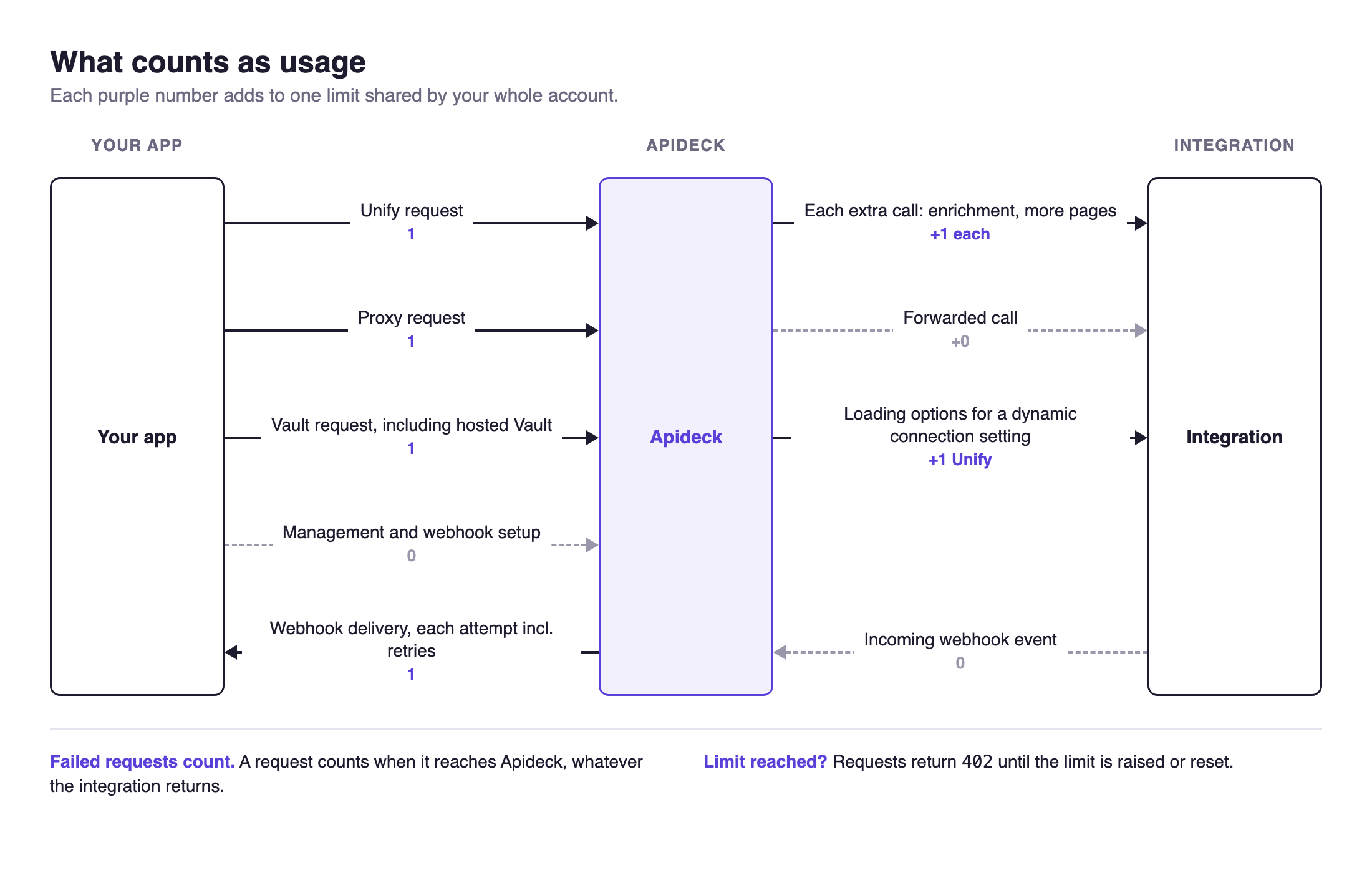
Usage is the number of requests counted against your plan's limit. Four kinds of activity count:
Unify requests, plus any extra calls we make to the integration to build the response
Proxy requests
Vault requests
Webhook deliveries to your endpoint
All four count toward the same limit, which applies to your whole account across every application and consumer.
Unify requests
Every Unify request counts as 1, even when the integration returns an error. When one Unify response takes more than one call to the integration, each extra call adds 1.
Take a CRM example. A request for a list of opportunities usually maps to one endpoint on the integration:
GET https://unify.apideck.com/crm/opportunities
|-> GET https://api.pipedrive.com/v1/deals
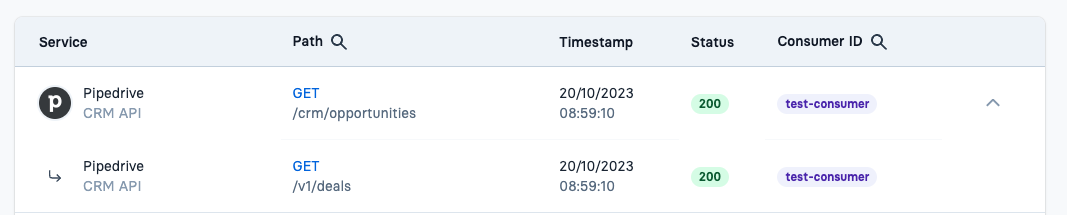
That's 1 Unify request, 1 call to the integration, and 1 usage.
Some integrations need more than one call to build a single Unify response:
GET https://unify.apideck.com/crm/opportunities
|-> GET https://api.hubapi.com/crm/v3/objects/deals
|-> GET https://api.hubapi.com/crm/v3/properties/deals
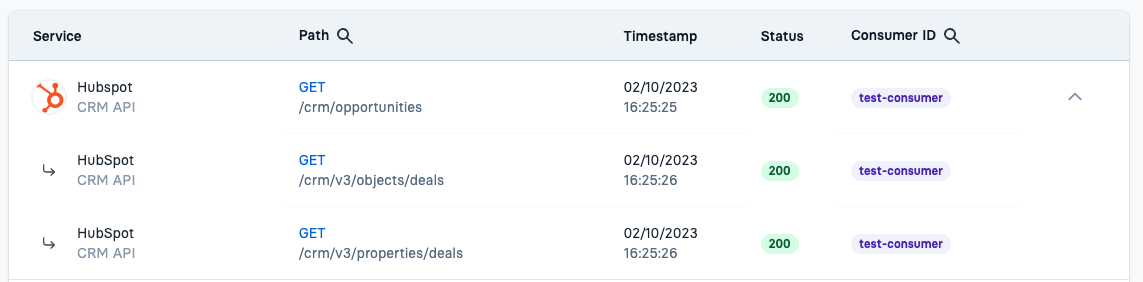
That's 1 Unify request, 2 calls to HubSpot, and 2 usage.
Some integrations return only a few fields on their list endpoints. To give you complete data, we enrich the response with extra calls. For example, many HRIS integrations don't return employment details, compensation, or bank accounts on "List employees", so we fetch them for "Get employee":
GET https://unify.apideck.com/hris/employees/12345
|-> GET https://charliehr.com/api/v1/bank_accounts/...
|-> GET https://charliehr.com/api/v1/company
|-> GET https://charliehr.com/api/v1/team_members/.../salaries
|-> GET https://charliehr.com/api/v1/team_members/...
|-> GET https://charliehr.com/api/v1/offices/...
|-> GET https://charliehr.com/api/v1/team_members/...
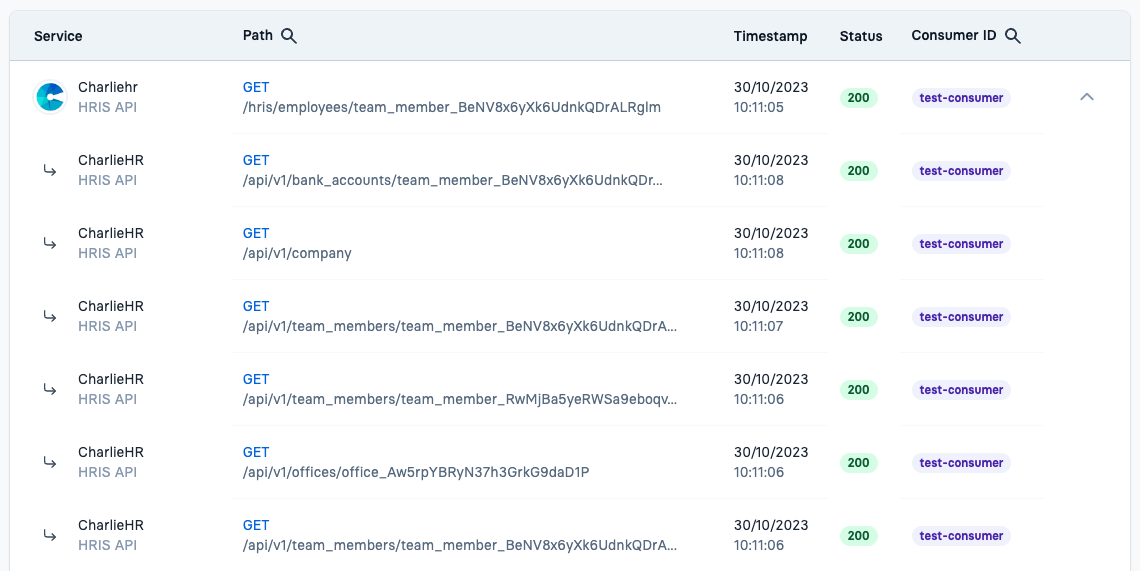
That's 1 Unify request, 6 calls to Charlie, and 6 usage:
Bank account info
Company info
Employee salary info
Manager info
Office info
Employee details
The same applies to writes. Creating or updating a record sometimes needs extra calls, for example to fetch the record's current version before updating it, and each extra call adds 1.
Pagination
Each page counts separately:
Pages you request. Each request for a list page counts as 1, and each extra call we make for that page adds 1, as above.
Pages fetched on your behalf. If you ask for a larger
limitthan the integration returns per page, we fetch several pages to fill your response. Each page after the first adds 1. For example,limit=200on an integration that returns 100 per page counts as 2 usage.
Failed requests
A request counts as soon as it reaches Unify, whatever the outcome. That includes:
Errors returned by the integration (
400,401,404,429,5xx)Authorization errors (
401,403)
Retrying a failed request counts again.
Proxy requests
Every Proxy request counts as 1, including requests where the integration returns an error.
Vault requests
Every Vault API request counts as 1. That includes, for example:
POST /vault/sessionsGET /vault/connectionsandGET /vault/connections/{unified_api}/{service_id}GET /vault/consumersandGET /vault/consumers/{consumer_id}Creating, updating, authorizing, and deleting connections
Connection settings, custom mappings, and logs
Calls to the Connector API count as Vault requests.
Connections with dynamic settings. On some connectors, a connection setting lists values loaded from the integration, such as NetSuite's Default Subsidiary. When you retrieve, create, or update a connection with such a setting, we load those values from the integration to include them in the response. That load currently counts as 1 Unify request, so retrieving one of these connections counts 2 usage (1 Vault + 1 Unify). The load happens whether or not the setting has a value.
Tip: Connection details rarely change. If your integration retrieves a connection before each API call, cache the result and refresh it only when the connection changes. This is the most common source of avoidable Vault usage.
Webhooks
Incoming events from integrations don't count.
Each delivery attempt to your webhook endpoint counts as 1. Retries after a failed delivery count again, so a delivery that succeeds on the third try counts 3 usage.
Virtual webhooks (for integrations without native webhooks) poll the integration on a schedule. Each poll counts as 1 Unify request, and each event delivered to you counts as 1 webhook.
A webhook endpoint that is down or slow to respond therefore increases usage, because every retry counts.
Not counted
Management API requests
Webhook subscription management requests
Incoming webhook events from integrations
Usage in the dashboard
The Unify, Vault, and Proxy counters on a consumer show that consumer's usage for the current calendar month (UTC). They reset at the start of each month.
Your plan limit is enforced across the whole account, summing every application, consumer, and request type, including webhook deliveries.
Request logs list every request we handle, including detail rows for failed calls to the integration. The number of log rows can therefore differ from your usage count. Use the counters for usage and the logs for debugging.
When your account reaches its limit, requests return 402 Payment Required until the limit is raised or reset. Contact us before you reach it if you expect a spike.