
Ecosystem: offering your marketplace in multiple languages
Your ecosystem can be shown in several languages, with translated listings and labels. Multi-language is part of the Growth and Enterprise plans.
Add languages
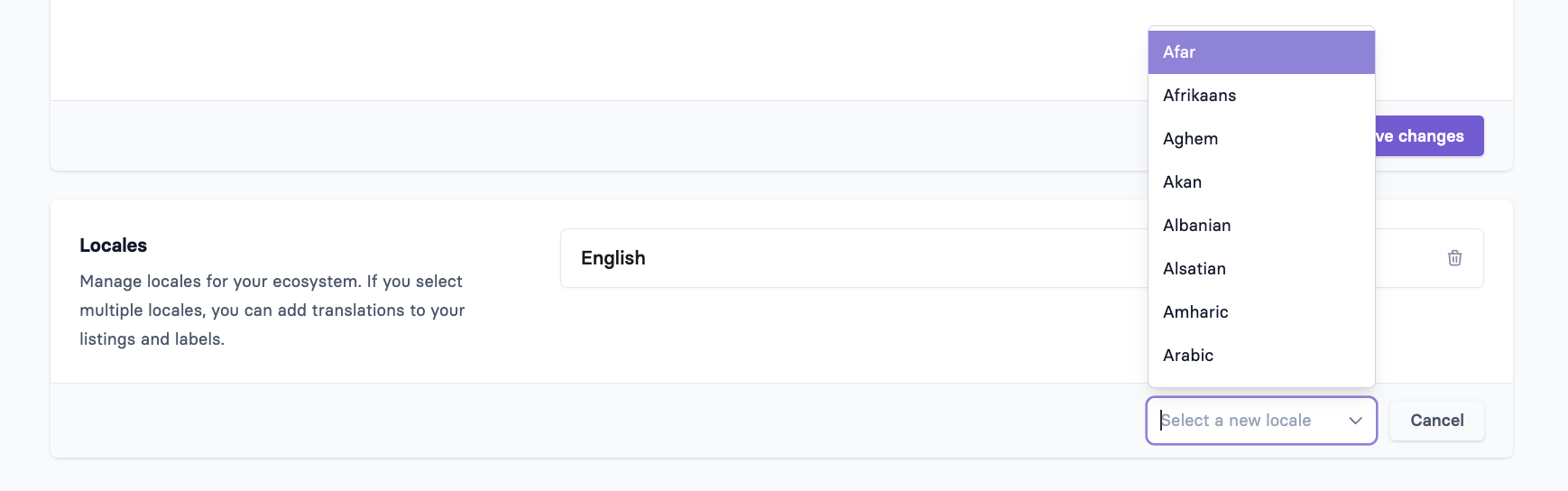
In the Apideck dashboard, go to Ecosystem → Settings → General and scroll to Locales.
Click Add locale and choose a language from the list. Repeat for each language you want to offer. One of them is your default language.

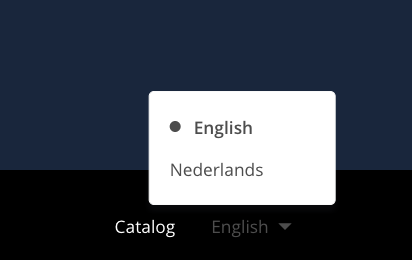
Once you have more than one language, visitors get a language switch in the navigation and footer. The language isn't picked automatically from the visitor's browser: visitors choose it themselves.
What gets translated
Built-in labels (buttons, menus, filters) come pre-translated in English, Dutch, German, French, Spanish, Swedish and Arabic.
Your listings: for each language you can translate a listing's name, tagline, description, features and pricing. If you use the partner portal, partners can translate their own listings too.
Your template texts: the masthead title and description, call-to-action texts, navigation and footer items, and similar labels can be translated in Settings → Template.
When a translation is missing
If a listing has no translation for the language a visitor chose, the ecosystem falls back to the English version, and then to the listing's original text.
Keep English enabled if you offer several languages. The fallback relies on it, and with English disabled, outdated text can stay visible in other languages.
If you edited a translation but the old text still shows, open the listing and save it again in each language. That makes sure every language version is up to date.