
Microsoft Entra: Employee dates are one day earlier than expected
1. Overview
Microsoft Entra stores date-only fields (such as hire date) as midnight in your organization's local timezone, but returns them to external systems as UTC timestamps. This means that when a date is entered in Entra, it can appear shifted by one day when read back through the Apideck HRIS connector.
This guide explains why this happens and how to fix it by configuring your timezone in the integration settings.
Affected fields: employeeHireDate (mapped to employment_start_date)
2. Why the date shifts
When an admin enters a date of 2022-02-22 in Microsoft Entra, Entra records it as midnight in the organization's local timezone. If that timezone is Europe/Brussels (UTC+1), midnight local time is 11 PM the previous day in UTC, so Entra returns:
"employeeHireDate": "2022-02-21T23:00:00Z"Without timezone configuration, the connector strips the time portion and returns:
"employment_start_date": "2022-02-21"This is one day earlier than the date that was entered in Entra.
3. How to fix it
The connector supports timezone configuration so that UTC timestamps are converted back to your local timezone before the date is returned. Once configured, the date returned will match what is shown in Entra.
Steps:
Open your Microsoft Entra integration in the Apideck dashboard
Click the ≡ menu icon in the top-left corner of the integration panel
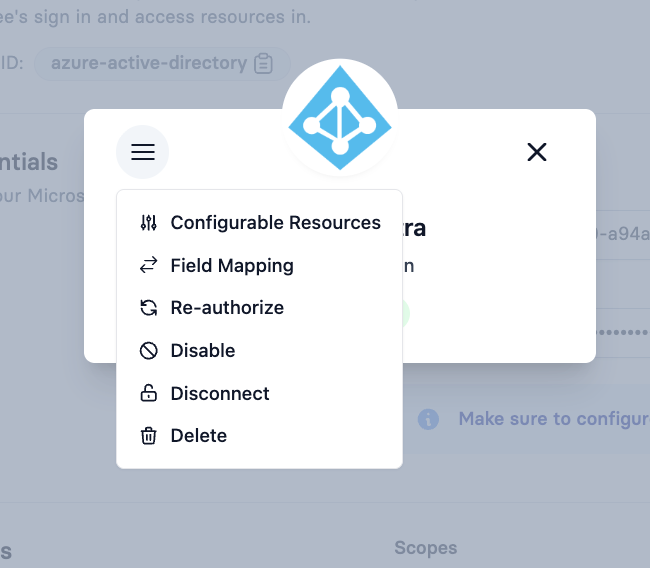
Select Configurable Resources
Select Employees
In the Timezone dropdown, select the IANA timezone that matches your organization (e.g.
Europe/Brussels,America/New_York)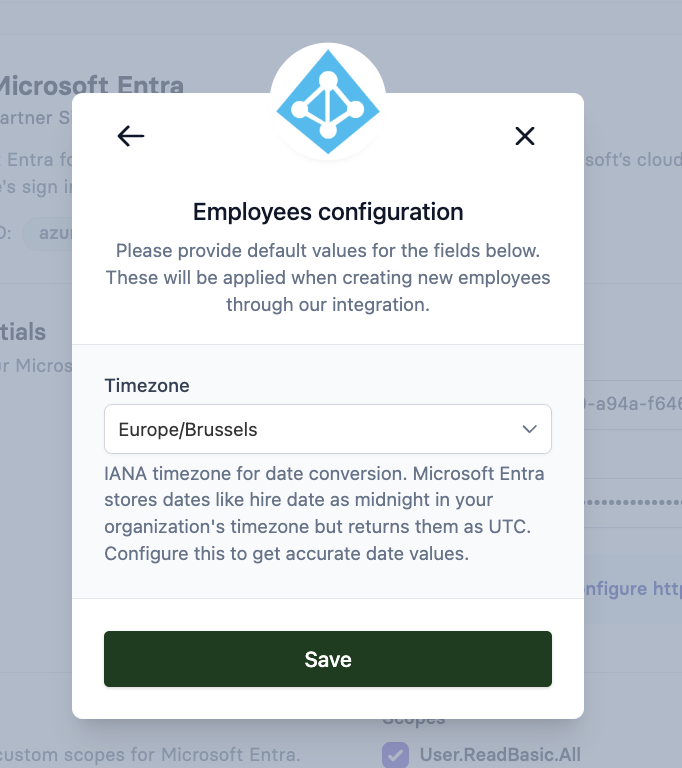
Click Save
After saving, the employment_start_date field will be returned as the correct local date.
4. Choosing the right timezone
Set the timezone to match the location of the administrators who enter dates in Microsoft Entra - not the server timezone or the consumer's timezone. This is the timezone Entra uses when converting a date to a UTC midnight timestamp.
Use the IANA timezone format (e.g. Europe/Brussels), not abbreviations like CET or offsets like GMT+1, as these do not account for daylight saving time.
If your HR team is spread across multiple timezones, use the timezone of the person or team responsible for entering hire dates in Entra.