
Visma Nmbrs: Employees created via API are not visible on the Payroll tab
1. Overview
When employees are created via the Apideck HRIS API without a nationalities field in the payload, Visma Nmbrs automatically classifies them as External type. Since the Nmbrs UI defaults to the Payroll tab, these employees appear to be missing - but they are there, just under a different tab.
This guide explains how to find the affected employees and how to fix new employee creation going forward.
2. How to find the existing employees
In the Nmbrs employee list, click the External tab. All employees created via the API without a nationality will be listed there.
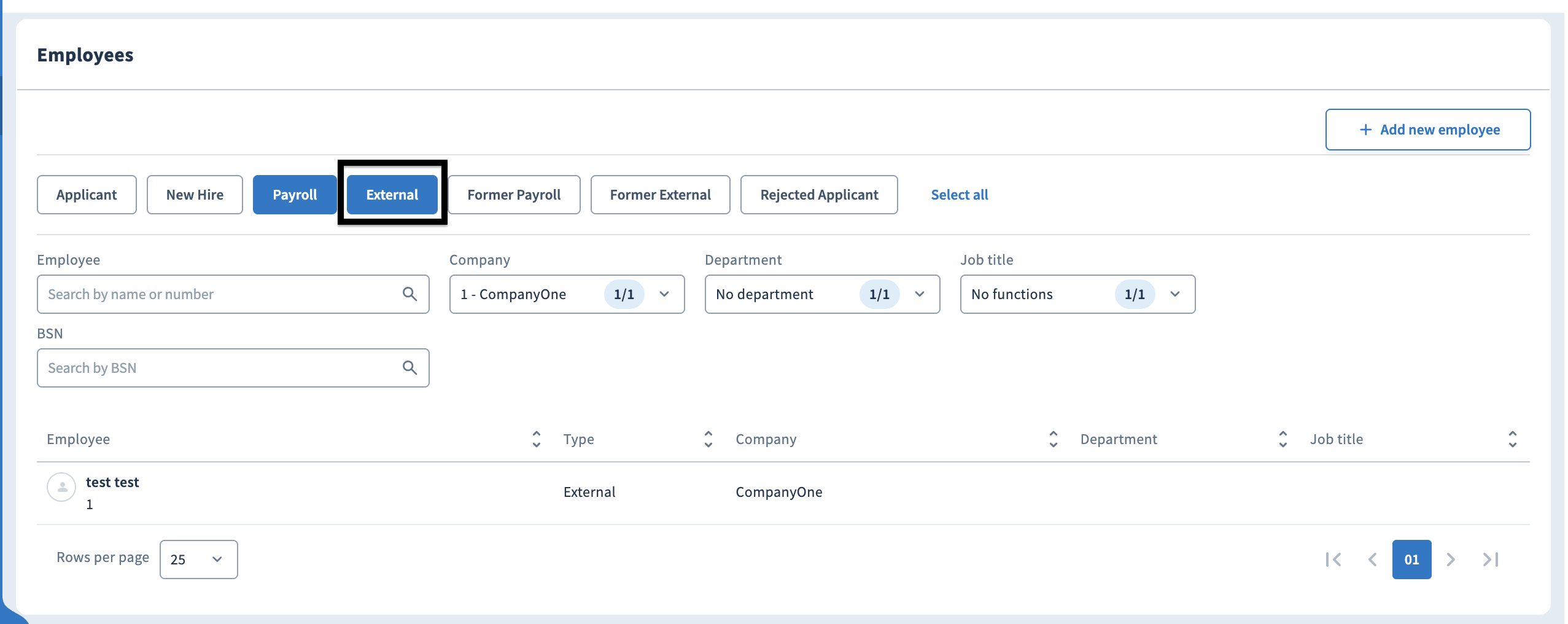
The Type column shows how each employee is classified:

3. Fix for new employees
To ensure employees are classified as Payroll type and appear in the default view, include the nationalities field in your create employee payload:
"nationalities": ["NL"]Use the appropriate country code for your employees (e.g. "BE" for Belgium, "DE" for Germany).
4. Why this happens
Nmbrs uses the presence of nationality data to determine employee type on creation. Without it, Nmbrs defaults to classifying the employee as External rather than Payroll. This is a Nmbrs-side classification rule and is not configurable via the Apideck connector.