
Humaans: get full employee details from the employee list
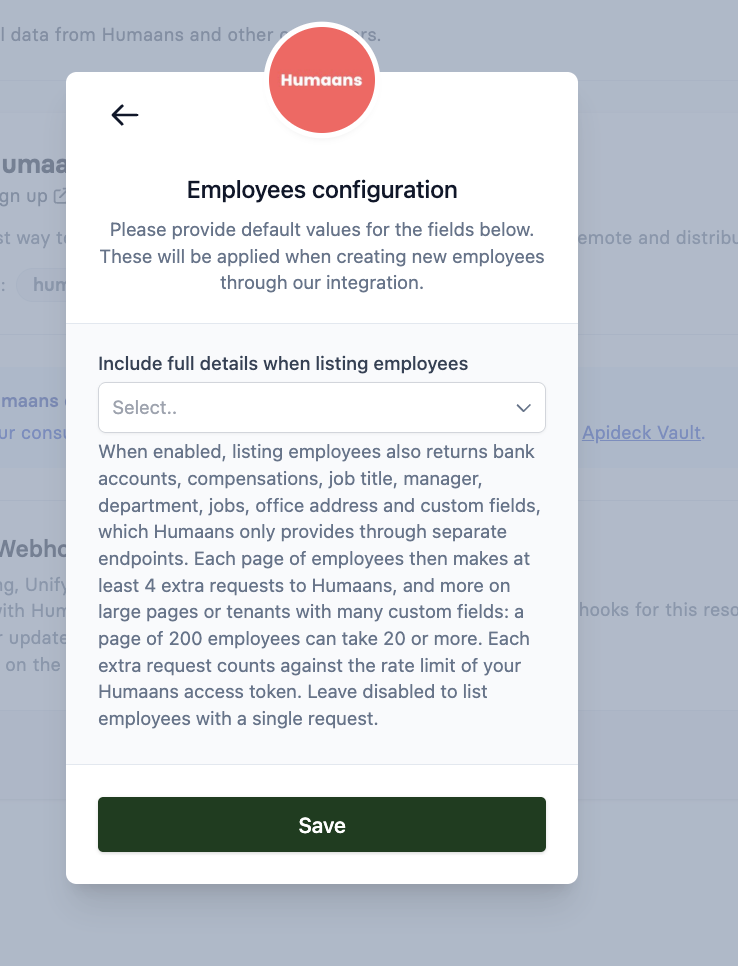
By default, listing Humaans employees (GET /hris/employees) returns a shorter version of each employee than fetching one employee (GET /hris/employees/{id}). Turn on the Include full details when listing employees setting to get the full details from the list in a few requests to Humaans, without one call per employee.
Why the list and the detail differ
Humaans keeps some employee data in separate endpoints: job roles, compensations, custom values, bank accounts and office locations. Without the setting:
List employees makes one request to Humaans per page and returns the core employee data: names, emails, phone numbers, employment status and dates, employee number, birthday, gender, team and primary address.
Get one employee makes up to 6 requests to Humaans for each employee (the person plus each separate endpoint) and also returns the fields below.
These fields are only in the detail response unless the setting is on:
Field | Comes from in Humaans |
|---|---|
| Job roles |
| Compensations |
| Custom values |
| Bank accounts |
Office address, and the location on | Locations |
Humaans' rate limit
Humaans limits API requests per access token, and enforces the limit from 1 November 2026. Requests over the limit get a 429 Too Many Requests. The limit allows a burst of 40 requests that refills at 7 requests per second, so about 460 requests in any one minute.
Calling GET /hris/employees/{id} for every employee costs up to 6 Humaans requests per employee. A sync of a few hundred employees can go over the limit within a minute. Humaans asks integrations to fetch whole collections with list requests instead of one request per person, and to use the largest page size. Through Apideck that's limit=200, the maximum on every list endpoint, even though Humaans' own API allows 250.
Turn on full details for the employee list
When the setting is on, GET /hris/employees fetches the extra data for the whole page in a few batched requests to Humaans and returns the same fields as the detail call. For a page of 200 employees that's usually 20 to 30 Humaans requests in total, instead of about 1,200 with detail calls. Tenants with many custom fields per employee need more, because custom values are the largest collection.
The setting is off by default and is set per connection.
In Vault
Open the Humaans connection in Vault.
Open the settings for the Employees resource.
Set Include full details when listing employees to Yes and click Save.
Through the API
Update the connection's Employees settings with Update settings:
PATCH https://unify.apideck.com/vault/connections/hris/humaans-io/employees/config
x-apideck-consumer-id: {consumer_id}
x-apideck-app-id: {app_id}
Authorization: Bearer {api_key}

{
  "configuration": [
    {
      "resource": "employees",
      "defaults": [
        { "id": "enrich_employee_list", "value": "true", "target": "resource" }
      ]
    }
  ]
}
Repeat this for each consumer that has a Humaans connection.
Recommended sync setup for Humaans
Turn on Include full details when listing employees.
Use
GET /hris/employeeswithlimit=200and followmeta.cursors.nextuntil it's empty. See How Pagination, Filtering, and Sorting Work.Stop calling
GET /hris/employees/{id}for each employee.If you don't need some of the extra data, request only the fields you use with the
fieldsparameter. Apideck then skips the Humaans requests for data you didn't ask for. For example,fields=id,first_name,last_name,title,department,managerskips compensations, custom values and bank accounts.
When a lookup fails
If one of the batched requests fails, for example because Humaans returns a 429 or the token isn't allowed to read that data, the list still returns 200:
The fields from that lookup are left out for that page.
meta.warningshas an entry with the operation and thestatus_code, for example{ "type": "downstream_request_failed", "operation": "compensationsAll", "status_code": 403 }.
A failed lookup and a lookup that found nothing look the same in the employee data, so use meta.warnings to tell them apart, not a missing field.
How to handle a warning:
429: fetch the page again after a delay of a few seconds, at most once or twice. A refetch repeats all of that page's Humaans requests, so retrying immediately adds to the burst that caused the 429. See Rate limits: understanding 429 errors.
5xx, or no status code: one delayed refetch is reasonable.
401, 403, 404: don't refetch. These won't change on a retry.
Compensations return 403
In Humaans, reading compensation data requires the compensations:read permission, which by default only owner and finance roles have. If the connected token doesn't have it, every page has a compensationsAll warning with status_code: 403. If you don't use compensation data, leave compensations out of the fields parameter and Apideck won't request it.
Related
HRIS: Why GET /employees and GET /employees/{id} return different fields
HRIS: why employees or fields are missing (without an error)
If your Humaans sync still gets 429s with the setting on, contact Apideck support through the Customer Portal (the Requests link at the top of this help center), your Slack channel with us, or support@apideck.com. Include the consumer ID and the time of the failed requests.